

APIs
Purple Fabric APIs Integration
Overview
The Purple Fabric API serves as a high-performance, RESTful interface designed to seamlessly integrate advanced AI capabilities into your applications, services, and workflows. With a strong focus on security, performance, and real-time data processing, the Purple Fabric API is tailored for enterprises and innovators looking to harness AI at scale, empowering teams to build smarter solutions faster.
This section details how to download an agent's auto-generated API directly from the Purple Fabric UI and leverage it to orchestrate or invoke agents inside your own external client systems, custom middleware, or API gateways.
Downloading APIs
Purple Fabric automatically compiles a standardized API file for every published agent in your workspace. This file maps all required endpoints, parameters, header security configurations, and request/response payloads needed for external consumption.
Step-by-step Process
Perform the following steps in Purple Fabric to download the APIs:
- Navigate to Expert Agent Studio and locate a specific published agent(e.g., Signal Capture - Outreach Drafter)
- Click on the three-dot context menu button on the bottom-right corner of the agent card
- Select Download Api from the dropdown menu
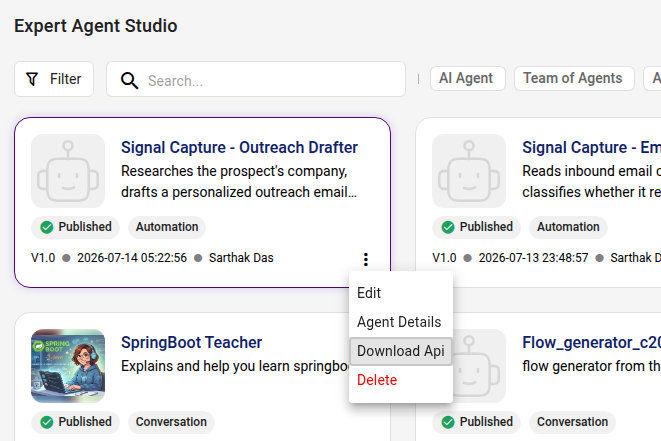
The platform will immediately generate and download a local JSON specification file (e.g., openapi.json) onto your local machine.
Integrating Conversation Agents
When you download the API contract for a conversational agent from the Expert Agent Studio, the generated OpenAPI specification contains a dedicated agent-interaction lifecycle divided into 7 core operational sections.
API Execution Flow (The 7 Integration Sections)
Section 1: Authentication Handshake
Before invoking agent features, secure an active JWT Bearer token bound to your corporate tenant partition.
- Method: GET
- Endpoint Path: /accesstoken/ (e.g., /accesstoken/idx)
- Headers Required: apikey, username, password
- Response Expected: Returns an access_token JWT. Pass this value as Authorization: Bearer <access_token> in all subsequent calls.
Section 2: Conversation Starters (Asset Discovery)
Fetch pre-configured prompt starters to present recommended entry-point prompts to end-users without exposing internal system configurations.
- Method: GET
- Endpoint Path: /purplefabric/v1/interaction/{asset_version_id}/session-starters
- Headers: Authorization, apikey
- Response Example:
{
  "session_starters": [
    "Explain what this code does and identify possible improvements.",
    "What are the main risks and security concerns?"
  ]
}
Section 3: Session Lifecycle Management
Initiate or query conversational threads. A session_id must be created to maintain thread memory and history.
3.1 Create a Session
- Method: POST
- Endpoint Path: /purplefabric/v1/interaction/{asset_version_id}/sessions
- Request Body:
{
  "session_name": "Q3 Financial Analysis Chat"
}- Response Expected (201 Created):
{
  "session_id": "6656f3c9d8a13f2d5c01a123",
  "asset": {
    "asset_version_id": "47ac415f-de51-4ac0-a28e-cdd3066a844f"
  },
  "created_date": "2026-05-27T10:15:30.000Z"
}
3.2 List Active Sessions
- Method: GET
- Endpoint Path: /purplefabric/v1/interaction/{asset_version_id}/sessions
- Query Parameters: page, limit (Optional for pagination)
Section 4: Session File Ingestion (Context Uploads)
Upload external documents (PDFs, Word docs, spreadsheets) to a session so the agent can reference them during conversation.
4.1 Upload Files to Session
- Method: POST
- Endpoint Path: /purplefabric/v1/interaction/sessions/{session_id}/files
- Content-Type: multipart/form-data
- Form Field: files (Binary stream)
4.2 Track File Processing Status
- Method: GET
- Endpoint Path: /purplefabric/v1/interaction/sessions/{session_id}/files
- Response: Poll until file_status reaches a terminal state (KB_CREATION_COMPLETED or failure states like KB_CREATION_FAILED).
Section 5: Real-time Message Streaming & Execution
Send user queries and handle real-time streaming chunks using Server-Sent Events (SSE).
- Method: POST
- Endpoint Path: /purplefabric/v1/interaction/sessions/{session_id}/messages
- Headers: Authorization: Bearer <token>, apikey: <key>
- Request Payload:
{
  "query": "Give me some insights about programming languages",
  "response_mode": "stream"
}
Understanding Stream Events (text/event-stream):
As the agent executes, the API streams chunks mapped to specific event types:
- MESSAGE_DETAILS: Sent first; carries execution tracking metadata (message_id, conversation_id).
- HEARTBEAT_STREAM: Keep-alive ping chunks (ignore during UI message rendering).
- LLM_RESPONSE_STREAM: Token chunks streamed in real-time.
- First fragment: status: START
- Intermediate fragments: status: IN_PROGRESS
- Final fragment: status: END
- FINAL_RESPONSE: Emits the aggregated, final response payload containing markdown outputs, source citations, context-window usage metrics, trace metadata, and generated file arrays.
- STREAM_END: Signals completion of the response stream.
Section 6: Artifact & Generated File Extraction
If an agent produces a downloadable document (e.g., an exported Excel report or compiled PDF) during its execution, download the raw binary bytes directly.
-
Method: GET
-
Endpoint Path:
/purplefabric/v1/interaction/sessions/{session_id}/messages/{message_id}/contents/{content_id}/artifacts/{file_name}/download -
Headers Required: Authorization, apikey
-
Response: Binary Stream (application/octet-stream or target file MIME type).
Note: The file_name variable in the path must be URL-encoded.
Section 7: History & Conversation Retrieval
Reconstruct full chat timelines or render UI chat history in external client applications.
- Method: GET
- Endpoint Path: /purplefabric/v1/interaction/sessions/{session_id}/messages
- Query Parameters: page, limit (Optional)
- Response Expected: Returns structured historical message content blocks, citations, feedback ratings, and attached user uploads.
Integrating Conversation Agents - Use Case
Here is a real-world step-by-step walkthrough of how an external system (such as an enterprise portal, web app, or middleware) integrates with a Purple Fabric Conversational Agent.
Scenario Context
Use Case: An internal "Financial Query Portal" allows financial analysts to chat with a pre-trained Purple Fabric Agent named Q3 Analysis Bot (asset_version_id: 47ac415f-de51-4ac0-a28e-cdd3066a844f).
Tenant: idx
Step 1: Authentication Handshake
Before sending queries, the external system obtains a temporary Bearer JWT token using tenant credentials.
- HTTP Method: GET
- Endpoint: [https://api.intellectqacloud.com/accesstoken/idx](https://api.intellectqacloud.com/accesstoken/idx)
- Headers:
apikey: your_org_api_key
username: analyst_user
password: secure_password- System Response (200 OK):
{
  "access_token": "eyJhbGciOiJIUzI1NiIsInR5cCI6IkpXVCJ9...",
  "expires_in": "3600"
}
The middleware stores this access_token and attaches it as Authorization: Bearer eyJhbGci... on every subsequent request.
Step 2: Fetch Pre-configured Conversation Starters
When the chat window loads on the user's screen, the system fetches recommended prompt starters to display as clickable suggestion buttons.
-
HTTP Method: GET
-
Endpoint: [https://api.intellectqacloud.com/purplefabric/v1/interaction/47ac415f-de51-4ac0-a28e-cdd3066a844f/session-starters](https://api.intellectqacloud.com/purplefabric/v1/interaction/47ac415f-de51-4ac0-a28e-cdd3066a844f/session-starters)
-
Headers:
Authorization: Bearer eyJhbGci...
apikey: your_org_api_key- System Response (200 OK):
{
  "session_starters": [
    "Summarize Q3 revenue growth by region.",
    "What are the top risk factors for Q4?"
  ]
}
The UI renders two quick-action buttons containing these prompt strings.
Step 3: Initiate a Chat Session
When the analyst opens a new tab or clicks a starter prompt, the external app initializes a tracked thread.
-
HTTP Method: POST
-
Endpoint: [https://api.intellectqacloud.com/purplefabric/v1/interaction/47ac415f-de51-4ac0-a28e-cdd3066a844f/sessions](https://api.intellectqacloud.com/purplefabric/v1/interaction/47ac415f-de51-4ac0-a28e-cdd3066a844f/sessions)
-
Headers:
Authorization: Bearer eyJhbGci...
apikey: your_org_api_key
Content-Type: application/json- Request Body:
{
  "session_name": "Analyst Session - Q3 Performance Review"
}- System Response (201 Created):
{
  "session_id": "6656f3c9d8a13f2d5c01a123",
  "created_date": "2026-05-27T10:15:30.000Z"
}
The external system stores session_id: 6656f3c9d8a13f2d5c01a123 in state to manage thread context.
Step 4: Context Document Upload (Optional)
The user wants the agent to analyze an external quarterly report (Q3_Internal_Report.pdf) alongside its existing enterprise knowledge.
4a. Upload File to Session
-
HTTP Method: POST
-
Endpoint: [https://api.intellectqacloud.com/purplefabric/v1/interaction/sessions/6656f3c9d8a13f2d5c01a123/files](https://api.intellectqacloud.com/purplefabric/v1/interaction/sessions/6656f3c9d8a13f2d5c01a123/files)
-
Headers: Authorization: Bearer ..., apikey: ...
-
Content-Type: multipart/form-data
-
Form Field (files): [Binary Data: Q3_Internal_Report.pdf]
Response (200 OK):
{
  "files": [
    {
      "file_id": "6656f3c9d8a13f2d5c01a126",
      "file_name": "Q3_Internal_Report.pdf",
      "file_status": "UPLOAD_SUCCESS"
    }
  ]
}
4b. Poll Processing Status
The app queries GET /sessions/6656f3c9d8a13f2d5c01a123/files until file_status reaches KB_CREATION_COMPLETED before allowing user queries regarding the document.
Step 5: Real-time Querying & Message Streaming (SSE)
The user types: "Generate a summary table comparing overall revenue vs European revenue."
-
HTTP Method: POST
-
Endpoint: [https://api.intellectqacloud.com/purplefabric/v1/interaction/sessions/6656f3c9d8a13f2d5c01a123/messages](https://api.intellectqacloud.com/purplefabric/v1/interaction/sessions/6656f3c9d8a13f2d5c01a123/messages)
-
Headers:
Authorization: Bearer eyJhbGci...
apikey: your_org_api_key
Content-Type: application/json
Accept: text/event-stream- Request Body:
{
  "query": "Generate a summary table comparing overall revenue vs European revenue.",
  "response_mode": "stream"
}- Event Stream Handling (Client UI Processing Pipeline):
data: {"event":"MESSAGE_DETAILS","status":"SUCCESS","content":{"message_id":"6656f3c9d8a13f2d5c01a124"}}

data: {"event":"LLM_RESPONSE_STREAM","status":"START","content":""}

data: {"event":"LLM_RESPONSE_STREAM","status":"IN_PROGRESS","content":"Here is"}

data: {"event":"LLM_RESPONSE_STREAM","status":"IN_PROGRESS","content":" the breakdown:"}

... [Tokens stream live onto UI] ...

data: {"event":"FINAL_RESPONSE","status":"SUCCESS","content":{"response":"### Q3 Financial Breakdown\n...","artifacts_generated":{"files":[{"file_name":"Q3_Revenue_Comparison.xlsx"}]},"message_content_id":"6656f3c9d8a13f2d5c01a125"}}

data: {"event":"STREAM_END","status":"SUCCESS","content":""}
Step 6: Artifact Extraction (Generated Files)
The agent created a downloadable Excel file named Q3_Revenue_Comparison.xlsx during the streamed response. The portal renders a Download Spreadsheet button.
-
HTTP Method: GET
-
Endpoint:
[https://api.intellectqacloud.com/purplefabric/v1/interaction/sessions/6656f3c9d8a13f2d5c01a123/messages/6656f3c9d8a13f2d5c01a124/contents/6656f3c9d8a13f2d5c01a125/artifacts/Q3_Revenue_Comparison.xlsx/download](https://api.intellectqacloud.com/purplefabric/v1/interaction/sessions/6656f3c9d8a13f2d5c01a123/messages/6656f3c9d8a13f2d5c01a124/contents/6656f3c9d8a13f2d5c01a125/artifacts/Q3\_Revenue\_Comparison.xlsx/download) -
Headers: Authorization: Bearer ..., apikey: ...
System Response (200 OK):
-
Content-Type: application/vnd.openxmlformats-officedocument.spreadsheetml.sheet
-
Body: Raw binary byte stream downloaded directly to the user's local disk.
Step 7: Reloading Session History
When the user logs in the following day and re-selects "Analyst Session - Q3 Performance Review", the portal fetches all past interactions to redraw the UI.
-
HTTP Method: GET
-
Endpoint: [https://api.intellectqacloud.com/purplefabric/v1/interaction/sessions/6656f3c9d8a13f2d5c01a123/messages](https://api.intellectqacloud.com/purplefabric/v1/interaction/sessions/6656f3c9d8a13f2d5c01a123/messages)
-
Headers: Authorization: Bearer ..., apikey: ...
System Response (200 OK):
{
  "messages": [
    {
      "message_id": "6656f3c9d8a13f2d5c01a124",
      "conversation_id": "6656f3c9d8a13f2d5c01a123",
      "content_type": "QUERY",
      "message_content": [
        {
          "query": "Generate a summary table comparing overall revenue vs European revenue.",
          "response": "### Q3 Financial Breakdown\n...",
          "artifacts_generated": {
            "files": [
              { "file_name": "Q3_Revenue_Comparison.xlsx" }
            ]
          }
        }
      ]
    }
  ]
}
The external portal parses this array and renders the complete chat thread including past prompts, responses, and file download triggers.
Integrating Automation Agents (Asynchronous / Batch Processing)
Automation agents handle long-running processes, background batch jobs, compliance auditing, and multi-step data pipelines where execution cannot block the client UI.
-
Execution Pattern: Asynchronous Polling or Queue Event Loop.
-
Primary Sub-category Route: AUTOMATION
-
Integration Steps for External Apps:
-
Event Trigger: Trigger an automated execution based on an external system event (e.g., document upload, scheduled cron job, database webhooks).
-
Job Initiation: Submit a POST request to /magicplatform/v1/invokeasset/{asset_version_id}/AUTOMATION
-
Capture Trace ID: Immediately store the returned trace_id in your application middleware database.
-
Status Polling Loop / Worker Listener: Implement a background worker (or exponential backoff polling routine) to query /magicplatform/v1/invokeasset/{trace_id} until the job status reaches completion.
-
Artifact Extraction: Once complete, extract structured evaluation outputs (autogen_results) or fetch generated document blobs (application/octet-stream) using the /download-stream endpoint to persist in your internal database or cloud storage.
-
[
JSONExternal System Event] ──> [Middleware] ──(1. POST /invokeasset/AUTOMATION)──> [Purple Fabric Engine]
│ │
├─<───────(2. Returns Unique trace_id)─────────────────┘
│
├─(3. Poll GET /invokeasset/{trace_id})──> [Status Check]
│ │
[Internal DB / Storage] <─── [Middleware] <─(4. Completed Payload & File Streams)──┘Creating Agents in Purple Fabric using APIs
Overview
The Purple Fabric Asset Engine enables organizations to move beyond manual setup and programmatically provision AI capabilities at scale using the platform's dedicated management API. This programmatic approach is essential for teams looking to embed agent creation directly into continuous integration/continuous deployment (CI/CD) pipelines, dynamically spin up customized agents based on application triggers, or synchronize environments across staging and production workspaces.
By exposing unified GraphQL endpoints through the API under the gateway, Purple Fabric allows external systems to bypass the traditional user interface entirely. Developers can programmatically deploy new agents, patch existing instructions, alter lifecycle states, and manage security parameters dynamically by executing API requests from any corporate microservice or enterprise middleware layer.
1. Conversation Agent APIs
Getting Access Token API Agents API Creating a New Conversation Agent API Updating a Conversation Agent API Deleting a Conversation Agent API
Getting Access Token API - Authentication & Authorization
Access Token API serves as the primary security gatekeeper for the Purple Fabric platform.
Request Method - GET
Gateway URL - https:///accesstoken/
Request Headers
Request Body
Not required for this request.
Sample Response
STATUS - 200 - application/json
{
   "result": "RESULT_SUCCESS",
   "active": true,
   "access_token": "eyJhbGciOiJSUzI1NiI....",
   "expires_in": "3600",
   "refresh_token": "eyJhbGciOiJIUzI1....",
   "refresh_expires_in": "1800"
}
STATUS - 401 - unauthorized
{
   "result": "RESULT_FAILURE",
   "message": "401 Unauthorized: [no body]",
   "active": false
}
Agents API
API to list the existing agents for the Logged In User (Private, public, subscribed,global(org level) public).
Request Method - POST
Gateway URL - https:///magicplatform/v1/assets
Request Headers
Request Body
query {
  assets(
    downloadImages: true
    assetInput: {
      filterLevel: { Organization: [private, public, subscribed] }
      sortFilters: { modified_date: DESC }
      commonfilters: { created_by: [], status: [] }
      assetFlags: {
        getAssetFeature: true
        getDeprecatedAssetsCount: true
        getLatestAssetVersion: true
      }
      assetFilters: {
        agent_type: []
        categories: [GENAI, WORKFLOW]
        sub_categories: [AUTOMATION, CONVERSATION, NEW]
      }
      searchFilter: ""
      getCurrentUserAssets: false
    }
    paginate: { page: 1, limit: 12 }
  ) {
    meta {
      itemCount
      totalItems
      itemsPerPage
      totalPages
      currentPage
      deprecatedAssetsCount
    }
    items {
      features {
        feature_id
        feature
        display_name
        description
        featureConfig {
          feature_config_id
          is_secret
          key
          value
          properties
          data_type
        }
        input_schema_data {
          entities {
            properties
          }
        }
      }
      auto_annotate {
        auto_annotation_id
        status
        abort_reason
        auto_annotation_version
        total_selected
        processed
      }
      documents {
        base64
        file_id
      }
      name
      display_name
      category
      sub_category
      asset_id
      asset_version_id
      description
      version
      tags
      tag_details {
        tag_id
        tag_name
        tag_type
      }
      published_by
      ui_component_url
      status
      spec_version
      is_public
      is_private
      skill_visibility
      created_date
      created_by
      modified_by
      modified_date
      subscription_id
      subscription_status
      subscribed_by_id
      user_id
      fabric_profile_id
      last_name
      first_name
      org_id
      org_name
      owner
      sub_category
      agent_type
      has_other_version
      is_file_mandatory
    }
  }
}
Sample Response
STATUS - 200 - application/json
{
    "data": {
        "assets": {
            "meta": {
                "itemCount": 12,
                "totalItems": 1027,
                "itemsPerPage": 12,
                "totalPages": 86,
                "currentPage": 1,
                "deprecatedAssetsCount": 2
            },
            "items": [
                {
                    "features": [
                        {
                            "feature_id": "4a31475d-1555-460a-9655-d87a5745cf8e",
                            "feature": "genai",
                            "display_name": "genai",
                            "description": null,
                            "featureConfig": [],
                            "input_schema_data": {
                                "entities": []
                            }
                        }
                    ],
                    "auto_annotate": null,
                    "documents": null,
                    "name": "TC_GenAI_249_260227_0255",
                    "display_name": "TC_GenAI_249_260227_0255",
                    "category": "GENAI",
                    "sub_category": "CONVERSATION",
                    "asset_id": "8e64c28e-836c-4e33-8746-ba2f859045d8",
                    "asset_version_id": "8437c105-339d-473b-99ca-e7248327afde",
                    "description": "Create a GenAI conversation asset - Default",
                    "version": "1.0",
                    "tags": [
                        "genai"
                    ],
                    "tag_details": null,
                    "published_by": null,
                    "ui_component_url": null,
                    "status": "PUBLISHED",
                    "spec_version": "2.0",
                    "is_public": false,
                    "is_private": false,
                    "skill_visibility": "WORKSPACE",
                    "created_date": "2026-02-27T02:56:55.917Z",
                    "created_by": "033000fb-3de1-4ae4-b448-b49340e41eef",
                    "modified_by": null,
                    "modified_date": "2026-02-27T03:11:21.892Z",
                    "subscription_id": null,
                    "subscription_status": null,
                    "subscribed_by_id": null,
                    "user_id": "033000fb-3de1-4ae4-b448-b49340e41eef",
                    "fabric_profile_id": "idxsandbox-user-9037353130",
                    "last_name": "Test",
                    "first_name": "Automation",
                    "org_id": "baeb5ece-684f-4f08-8832-7286daae1f62",
                    "org_name": "idxsandbox",
                    "owner": "Automation Test",
                    "agent_type": "SINGLE_AGENT",
                    "has_other_version": false,
                    "is_file_mandatory": false
                },
                {
                    "features": [
                        {
                            "feature_id": "a438d978-c285-40db-88b1-3d62f29b56a0",
                            "feature": "genai",
                            "display_name": "genai",
                            "description": null,
                            "featureConfig": [],
                            "input_schema_data": {
                                "entities": []
                            }
                        }
                    ],
                    "auto_annotate": null,
                    "documents": null,
                    "name": "TC_GenAI_025_260227_0255",
                    "display_name": "TC_GenAI_025_260227_0255",
                    "category": "GENAI",
                    "sub_category": "CONVERSATION",
                    "asset_id": "80c37934-7e65-49b7-9cd7-da809f9671c2",
                    "asset_version_id": "fea07e7b-4b16-4e20-b9fe-ad78a7b1fa45",
                    "description": "RAG Description",
                    "version": "1.0",
                    "tags": [
                        "genai"
                    ],
                    "tag_details": null,
                    "published_by": null,
                    "ui_component_url": null,
                    "status": "PUBLISHED",
                    "spec_version": "2.0",
                    "is_public": false,
                    "is_private": false,
                    "skill_visibility": "NONE",
                    "created_date": "2026-02-27T02:59:00.937Z",
                    "created_by": "033000fb-3de1-4ae4-b448-b49340e41eef",
                    "modified_by": null,
                    "modified_date": "2026-02-27T03:01:07.938Z",
                    "subscription_id": null,
                    "subscription_status": null,
                    "subscribed_by_id": null,
                    "user_id": "033000fb-3de1-4ae4-b448-b49340e41eef",
                    "fabric_profile_id": "idxsandbox-user-9037353130",
                    "last_name": "Test",
                    "first_name": "Automation",
                    "org_id": "baeb5ece-684f-4f08-8832-7286daae1f62",
                    "org_name": "idxsandbox",
                    "owner": "Automation Test",
                    "agent_type": "SINGLE_AGENT",
                    "has_other_version": false,
                    "is_file_mandatory": false
                }
            ]
        }
    }
}
Creating a New Conversation Agent API
API to create a new Conversation Agent
Request Method - POST
Gateway URL - https:///magicplatform/v1/assets
Request Headers
Request Body
query {
mutation {
    createAsset(createAssetInput: {
        createAssetAndVersion: {
            versionDetail: {
                description: "Provides finance related support",
                status: INITIATED,
                display_name: "Finance Help",
                is_private: true
            },
            assetDetail: {
                name: "Finance Help",
                category: GENAI,
                sub_category: CONVERSATION,
                agent_type: SINGLE_AGENT
            }
        }
    }) {
        asset_version_id
        created_date
        modified_date
        is_private
        asset {
            sub_category
        }
    }
}
}
While creating agents, make sure that the category is always set as ‘GENAI’ and sub_category as CONVERSATION for conversation agents. Refer to
Sample Response
STATUS - 200 - application/json
{
    "data": {
        "createAsset": {
            "asset_version_id": "b10ad5ae-67b2-476a-bd13-9881189194e4",
            "created_date": "2026-03-03T10:47:08.429Z",
            "modified_date": "2026-03-03T10:47:08.429Z",
            "is_private": true,
            "asset": {
                "sub_category": "CONVERSATION"
            }
        }
    }
}
Updating a Conversation Agent API
API to update a conversation agent
Request Method - POST
Gateway URL - https:///magicplatform/v1/assets
Request Headers
Request Body
query {
mutation {
  updateAsset(
    updateAssetInput: { status: CREATION_IN_PROGRESS }
    asset_version_id: "35b4dc07-e012-4348-a910-69610a7ea49a"
  ) {
    asset {
      name
      category
    }
    asset_version_id
    status
    display_name
    is_private
    skill_visibility
    assetRun {
      asset_run_id
      run_no
      run_id
      run_type
      status
    }
    asset_latest_run {
      asset_run_id
      run_no
      run_id
      run_type
      status
    }
  }
}}
Sample Response
STATUS - 200 - application/json
{
    "data": {
        "updateAsset": {
            "asset": {
                "name": "Finance Chat Assistant",
                "category": "GENAI"
            },
            "asset_version_id": "35b4dc07-e012-4348-a910-69610a7ea49a",
            "status": "CREATION_IN_PROGRESS",
            "display_name": "Finance Chat Assistant",
            "is_private": true,
            "skill_visibility": "NONE",
            "assetRun": [
                {
                    "asset_run_id": "68e5b399-2f6a-4e6a-9257-1cc5b15b6c07",
                    "run_no": 1,
                    "run_id": null,
                    "run_type": "CHUNKING",
                    "status": "CREATED"
                }
            ],
            "asset_latest_run": {
                "asset_run_id": "68e5b399-2f6a-4e6a-9257-1cc5b15b6c07",
                "run_no": 1,
                "run_id": null,
                "run_type": "CHUNKING",
                "status": "CREATED"
            }
        }
    }
}
Deleting a Conversation Agent API
Request Method - POST
URL - https:///magicplatform/v1/assets
Request Headers
Request Body
query {
mutation {
  deleteAssetVersion(
    asset_version_id: "35b4dc07-e012-4348-a910-69610a7ea49a"
    force_delete: false
  ) {
    asset_delete_status
    deletion_detail {
      annotation
      mlopshousekeeping
      mlopsschema
    }
  }
}
}
Sample Response
STATUS - 200 - application/json
{
    "data": {
        "deleteAssetVersion": {
            "asset_delete_status": "SUCCESS",
            "deletion_detail": {
                "annotation": null,
                "mlopshousekeeping": true,
                "mlopsschema": null
            }
        }
    }
}
2. Automation Agent APIs
Getting Access Token API Creating an Automation Agent API
Getting Access Token API - Authentication & Authorization
Access Token API serves as the primary security gatekeeper for the Purple Fabric platform.
Request Method - GET
Gateway URL - https:///accesstoken/
Request Headers
Request Body
Not required for this request.
Sample Response
STATUS - 200 - application/json
{
   "result": "RESULT_SUCCESS",
   "active": true,
   "access_token": "eyJhbGciOiJSUzI1NiI....",
   "expires_in": "3600",
   "refresh_token": "eyJhbGciOiJIUzI1....",
   "refresh_expires_in": "1800"
}
STATUS - 401 - unauthorized
{
   "result": "RESULT_FAILURE",
   "message": "401 Unauthorized: [no body]",
   "active": false
}
Creating an Automation Agent API
Request Method - POST
URL - https:///magicplatform/v1/assets
Request Headers
Request Body
query {
mutation {
    createAsset(createAssetInput: {
        createAssetAndVersion: {
            versionDetail: {
                description: "Credit Decisioning Audition",
                status: INITIATED,
                display_name: "Credit Decisioning Auditor",
                is_private: true
            },
            assetDetail: {
                name: "Credit Decisioning Auditor",
                category: GENAI,
                sub_category: AUTOMATION,
                agent_type: SINGLE_AGENT
            }
        }
    }) {
        asset_version_id
        created_date
        modified_date
        is_private
        asset {
            sub_category
        }
    }
}
}
While creating agents, make sure that the category is always set as ‘GENAI’ and sub_category as ‘AUTOMATION’ for automation agents. Refer to
Sample Response
STATUS - 200 - application/json
{
    "data": {
        "createAsset": {
            "asset_version_id": "df2f01b0-2c42-42da-a76b-0d960e3ddbfe",
            "created_date": "2026-03-03T10:27:48.307Z",
            "modified_date": "2026-03-03T10:27:48.307Z",
            "is_private": true,
            "asset": {
                "sub_category": "AUTOMATION"
            }
        }
    }
}